Canva vs Photoshop: Which Tool Should Beginners Learn?
Graphic design has become an important skill for students, freelancers, digital marketers, content creators, and business owners. Whether you want to design social media posts, create marketing materials, edit photos, or build a professional portfolio, choosing the right design tool is an important first step.
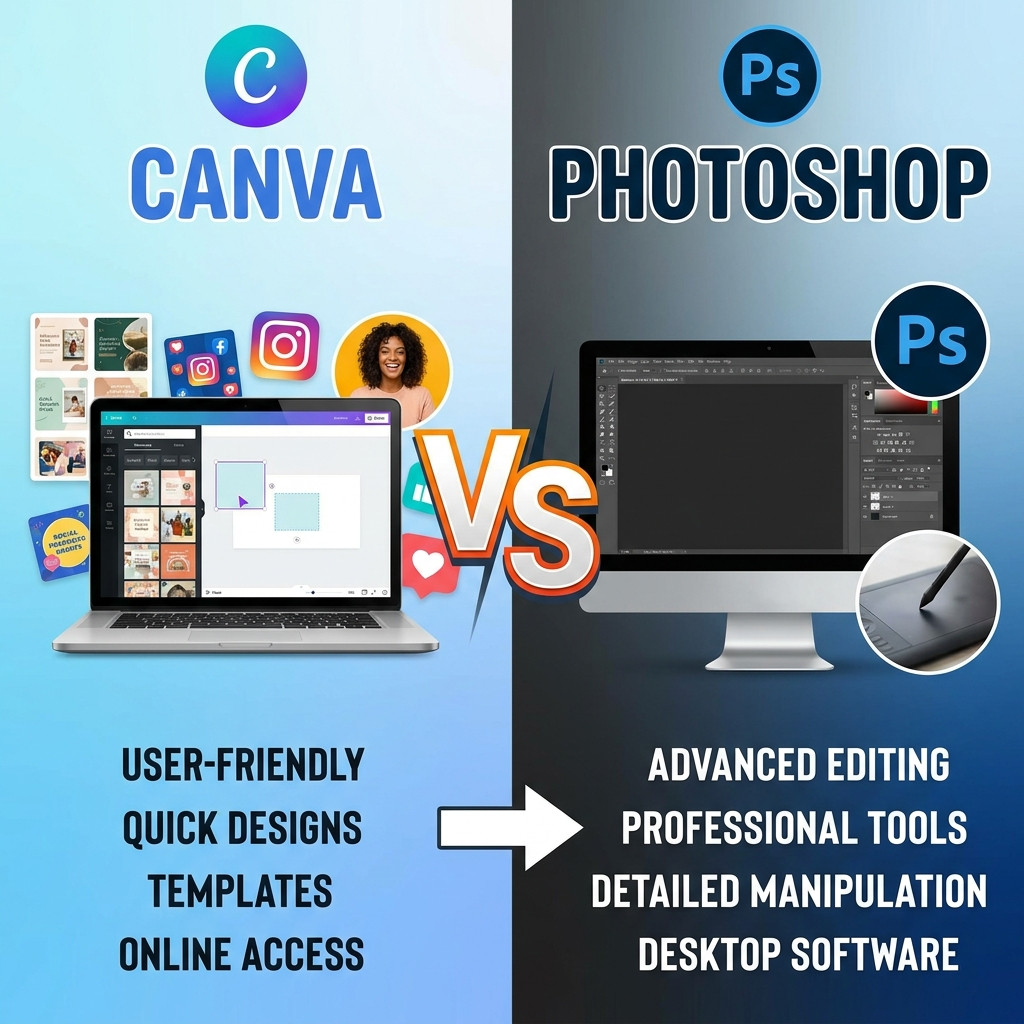
Two popular tools beginners often compare are Canva and Adobe Photoshop. Both can help you create attractive visuals, but they serve different purposes and offer different features.
So, Canva vs Photoshop: which tool should beginners learn first? The answer depends on your goals, experience, budget, and the type of design work you want to do.
In this guide, we will compare Canva and Photoshop based on ease of use, features, pricing, career opportunities, and practical applications to help you make the right decision.
What Is Canva?
Canva is an online graphic design platform designed to make visual content creation accessible to people with different levels of design experience. It offers ready-made templates, drag-and-drop editing, stock assets, fonts, and various tools for creating digital and printed designs.
Beginners can use Canva to create professional-looking designs without learning complicated editing techniques first.
Key Features of Canva
Ready-made templates for social media posts, presentations, posters, and advertisements.
A drag-and-drop editor that makes designing easier.
Built-in access to fonts, illustrations, photos, and other design elements.
Brand kits and collaboration features, depending on the plan.
AI-powered design and content features, depending on availability and subscription.
Cloud-based access that makes sharing and collaboration convenient.
What Can You Create with Canva?
Canva is useful for creating Facebook and Instagram posts, YouTube thumbnails, presentations, marketing banners, flyers, invitations, simple logos, and business documents.
For example, a small business owner can use Canva to design a week's worth of social media graphics without hiring a designer for every post.
What Is Adobe Photoshop?
Adobe Photoshop is a professional image-editing and graphic design application widely used by photographers, graphic designers, digital artists, and advertising professionals.
Unlike Canva, Photoshop provides extensive control over images, layers, selections, masks, colors, effects, and detailed visual compositions. It is particularly valuable when a project requires advanced photo manipulation or precise editing.
Key Features of Photoshop
Advanced photo editing and retouching tools.
Layer-based editing for complex design projects.
Masks and selections for precise image adjustments.
Professional color correction and image enhancement.
Compositing, background replacement, and creative manipulation.
AI-assisted features, depending on the version and subscription.
What Can You Create with Photoshop?
Photoshop is commonly used for photo retouching, product image editing, advertising creatives, YouTube thumbnails, digital artwork, photo manipulation, website graphics, and detailed marketing designs.
For example, an e-commerce designer can use Photoshop to remove a product's background, improve lighting, correct colors, and create a polished promotional image.
Canva vs Photoshop: Key Differences
Understanding the differences between Canva and Photoshop will help you select the right tool for your learning journey.
| Feature | Canva | Adobe Photoshop |
|---|---|---|
| Ease of use | Very beginner-friendly | Requires more practice |
| Main purpose | Quick visual design | Advanced image editing and design |
| Templates | Extensive ready-made templates | More manual design work |
| Photo editing | Basic to moderate | Advanced and detailed |
| Social media graphics | Excellent for fast production | Excellent for customized designs |
| Layer control | Simplified design controls | Extensive layer and mask controls |
| Collaboration | Convenient online collaboration | Collaboration options depend on setup |
| Learning curve | Generally short | Generally longer |
| Platform | Primarily web-based, with apps | Desktop application, with additional ecosystem options |
| Pricing | Free and paid plans | Subscription-based options |
The best choice depends on what you need to create. Canva emphasizes speed and accessibility, while Photoshop emphasizes detailed editing and creative control.
1. Which Tool Is Easier for Beginners?
Canva is generally easier for beginners because it provides templates, preset layouts, and a straightforward drag-and-drop interface. You can start creating social media posts or presentations with little technical knowledge.
Photoshop has a steeper learning curve. Beginners need to understand concepts such as layers, masks, selections, blending modes, and image resolution. These concepts may take time to master, but they provide greater flexibility for complex projects.
Winner for beginners: Canva.
If your immediate goal is to create attractive designs quickly, Canva is a practical starting point. If you want to develop advanced image-editing skills, learning Photoshop is worth the investment.
2. Which Tool Is Better for Professional Graphic Design?
Both tools can be used professionally, but their strengths differ.
Canva is widely useful for recurring marketing materials, branded social media content, presentations, and template-based design work. It helps teams produce consistent visuals efficiently.
Photoshop is better suited to detailed photo editing, image compositing, advertising artwork, creative manipulation, and projects requiring precise control over visual elements.
However, professional graphic design involves more than software knowledge. Typography, color theory, composition, spacing, visual hierarchy, and understanding client requirements are essential regardless of which tool you choose.
Winner: Photoshop for advanced image manipulation; Canva for fast, repeatable marketing design.
3. Canva vs Photoshop for Freelancing
If you want to start freelancing, both tools can help you offer valuable services.
Freelancing Services You Can Offer with Canva
Social media post design.
Presentation design.
Marketing flyers and posters.
Simple promotional banners.
Branded templates for businesses.
YouTube thumbnails and content graphics.
Canva can help beginners start with relatively simple projects and build a portfolio.
Freelancing Services You Can Offer with Photoshop
Professional photo retouching.
Product image editing.
Advertising creative design.
Photo manipulation and compositing.
Advanced thumbnail design.
E-commerce image enhancement.
Photoshop can support more specialized editing services, but clients will expect strong technical and visual skills.
Freelancing opportunities depend on your portfolio, communication, service quality, and ability to find clients. Learning either tool does not guarantee income.
4. Which Tool Is Better for Digital Marketing?
Digital marketers regularly need visual content for advertisements, social media campaigns, email marketing, landing pages, and promotional materials.
Canva is especially convenient for producing multiple campaign graphics quickly. Templates and brand tools can help maintain consistency across different platforms.
Photoshop becomes useful when an advertisement needs custom image editing, advanced retouching, product manipulation, or a distinctive visual style.
For example, a digital marketer could use Photoshop to prepare a polished product image and then use Canva to adapt the campaign into several social media formats.
Best approach: Learn Canva for everyday marketing content and Photoshop for advanced creative work.
5. Canva vs Photoshop: Pricing and Accessibility
Canva offers a free plan and paid subscription options. The free plan is enough for many basic design tasks, although some templates, assets, and advanced features require payment.
Adobe Photoshop is generally offered through a paid subscription. The exact cost depends on the plan, region, and current offers. Check the official websites for current pricing before subscribing.
Canva is accessible through a web browser and supported apps, making it convenient for users who do not want to install a large desktop application.
Photoshop is a more resource-intensive professional application. Before using it, check your computer's operating system and hardware against Adobe's current system requirements.
For students and beginners on a limited budget, Canva's free plan is a convenient way to begin learning visual design.
6. Can You Learn Canva and Photoshop Together?
Yes. Learning both tools can be more valuable than treating them as competing alternatives.
A practical learning sequence is:
Step 1: Learn design fundamentals. Understand color combinations, typography, alignment, spacing, contrast, and visual hierarchy.
Step 2: Start with Canva. Create social media graphics, presentations, posters, and advertisements. Focus on layout and consistency instead of relying entirely on templates.
Step 3: Learn Photoshop fundamentals. Practice layers, selections, masks, cropping, retouching, background removal, and color correction.
Step 4: Create real projects. Design a social media campaign, edit product photographs, and create a set of branded marketing materials.
Step 5: Build a portfolio. Showcase your best work and explain the design problem each project solves.
This approach helps you develop both speed and technical ability.
7. Which Tool Should You Learn First in 2026?
Choose Canva first if you:
Have no previous graphic design experience.
Want to create social media content quickly.
Work in digital marketing or content creation.
Need an accessible tool for presentations and promotional graphics.
Want to begin practicing design fundamentals.
Choose Photoshop first if you:
Want to become a professional photo editor.
Are interested in photo manipulation or compositing.
Want to work with detailed advertising creatives.
Enjoy experimenting with images and visual effects.
Are ready to invest time in learning advanced editing techniques.
If your goal is a long-term career in graphic design, learning both tools alongside core design principles is a strong option.
Frequently Asked Questions (FAQs)
Is Canva better than Photoshop for beginners?
Canva is generally easier for beginners because it offers templates and a simple editing interface. Photoshop is more suitable when you need advanced photo editing and greater creative control.
Can I become a graphic designer by learning only Canva?
You can create useful designs and pursue certain design projects with Canva alone. However, learning additional tools and design fundamentals can expand the types of projects you can handle.
Is Photoshop necessary for freelancing?
No. Many design services can be delivered using Canva or other tools. Photoshop is particularly useful for clients who need advanced image editing, retouching, or custom visual compositions.
Which tool is better for social media post design?
Canva is often more convenient for producing social media posts quickly. Photoshop is useful when a post requires complex image manipulation or highly customized visuals.
How long does it take to learn Canva and Photoshop?
Basic Canva skills can often be developed in a few days of regular practice. Learning Photoshop fundamentals may take several weeks, while advanced professional skills can require months or longer. Your progress depends on your practice time and project complexity.
Conclusion
When comparing Canva vs Photoshop, there is no single winner for every beginner. Canva is an excellent starting point for quick, accessible design work, while Photoshop offers advanced tools for image editing and creative control.
If you are new to graphic design, start with Canva to learn layouts, typography, colors, and visual communication. Then explore Photoshop as your projects become more complex.
For aspiring freelancers and digital marketers, combining both tools can help you handle a wider range of creative tasks. Most importantly, practice with real projects and build a portfolio that demonstrates your skills.
Ready to develop your graphic design skills? Explore the training programs available at Unique IT Institute and choose a learning path that matches your interests and career goals.